A plan records what you expect. An actual entry records cash received or spent. A remaining obligation is the part of a bill that still needs to be paid. Treating all three as the same kind of entry can make a budget misleading.
The $65 example
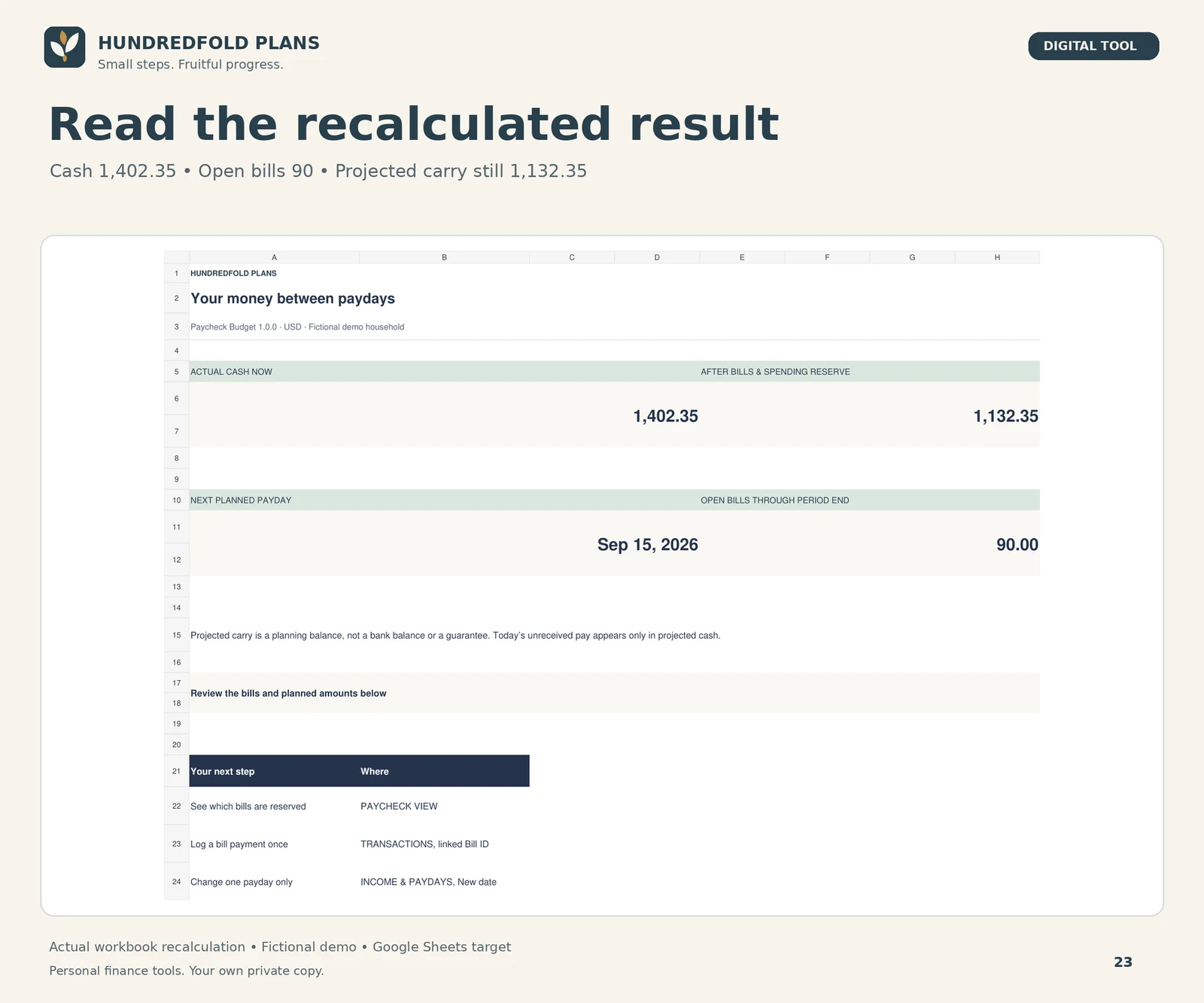
The Paycheck demonstration links a $65 actual internet payment to bill B-002. Here are the fictional results before and after, with the same $180 variable-spending reserve:
| Measure | Before payment | After payment |
|---|---|---|
| Actual cash | $1,467.35 | $1,402.35 |
| Open bills in the window | $155.00 | $90.00 |
| Spending reserve | $180.00 | $180.00 |
| Projected carry | $1,132.35 | $1,132.35 |
Before: $1,467.35 minus $155 minus $180 is $1,132.35. After: $1,402.35 minus $90 minus $180 is also $1,132.35. Cash has fallen, but so has the unpaid obligation. Counting the paid $65 again as unpaid would understate this projected remainder.
What to enter
Keep the planned occurrence in BILLS and record the actual payment in TRANSACTIONS with the matching Bill ID. Different occurrences need distinct IDs even when the bill name repeats. For a partial payment, review the amount still open rather than assuming the whole bill has been settled.
What a partial payment changes
In a separate illustrative case, a $100 bill has a $40 linked actual payment. Its remaining obligation is $60. Actual cash falls by $40, and the amount still reserved for that bill falls by $40. Do not enter another $40 expense just to update the bill record.
The Paycheck Budget product page explains the supplied Bill ID workflow and capacity limits. The free calendar uses whole-bill Open/Paid status, so this partial-payment example belongs to Paycheck's linked ledger.
Annual Budget uses a different comparison
In Annual Budget, a category plan is compared with actual cash entries. It does not reserve unpaid bills or create a payday window. A refund reduces recorded net spending; it is not a new spending plan. The annual demonstration increases a refund from $12.65 to $20.00, changing net cash by $7.35.
Monthly versus annual: the same record at two useful scales
A monthly review asks what happened within one period. An annual view helps you notice that the periods are uneven. It does not require a second purchase or a second copy of each transaction.
Suppose a fictional household expects a $600 renewal in December and no payments for that renewal in the other eleven months. The annual cost averages $50 per month, but the actual cash payment is still $600 in December. Entering twelve actual payments of $50 would describe a different cash history. An average can inform planning; it is not evidence of twelve payments.
| Question | Record to review |
|---|---|
| What amount did I plan for this category and month? | The monthly category plan |
| What was actually received, spent or refunded? | The dated cash entries for that period |
| Which months differ from the others? | The year view |
| What must be funded before a particular payday? | A separate bill-and-payday review |
The Annual Budget places twelve monthly category plans and a year view in one workbook. Preserve each actual transaction once in that file. If you also use Paycheck Budget, choose how you will reconcile the overlapping records; the files do not synchronize. For allocating savings toward the renewal before it falls due, use the separate sinking fund workflow.
Check the record before changing a formula
If a result looks wrong, check the entry date, type, amount, Bill ID where applicable, selected period and whether you entered the payment twice. Preserve your working history. If you overwrote a formula, use a fresh CLEAN import rather than clearing calculated cells.
Watch the Paycheck demonstration, read the bill-window example or open setup help.